
База знань
- Головна
- База знань
- Preferences
- How do I change my cPanel theme?
Категорія
Категорія
How do I change my cPanel theme?
- Login to cPanel.
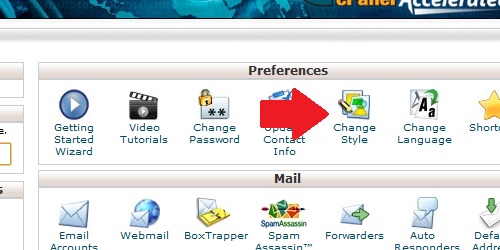
- Locate and click on the "Change Style" icon located in the "Preferences" category.
On the next page, simply select the style you want and click on the "Switch Style to [theme]" button.
Ця відповідь Вам допомогла?
Також прочитайте
How do I change my cPanel Password?
If you know your cPanel password: Log in to cPanel. Locate the "Change Password" icon. Fill...
How do I change my language in cPanel?
Login to cPanel. Locate and click on the "Change Language" icon under the "Preferences"...
How do I update my contact information?
Login to cPanel. Locate and click on the "Update Contact Info" icon in the "Preferences"...
Title
Loading...
Loading...