
Bilgi Bankası
- Ana Sayfa
- Bilgi Bankası
- Databases
- How do I create a MySQL database?
Kategoriler
Kategoriler
How do I create a MySQL database?
- Login to cPanel.
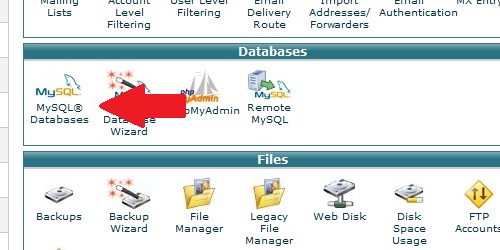
- Locate and click on the "MySQL Databases" icon in the "Databases" category.
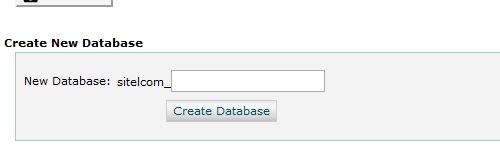
Under the "Create a New Database" heading, enter a name for your database. Click the "Create Database" button.
Bu cevap yeterince yardımcı oldu mu?
Ayrıca okuyun
How do I delete a MySQL database?
Login to cPanel. Locate and click on the "MySQL Databases" icon under the "Databases"...
How do I remove a MySQL user from a database?
Login to cPanel. Locate and click on the "MySQL Databases" icon within the "Databases"...
How do I delete a MySQL user?
Login to cPanel. Locate and click on the "MySQL Databases" icon under the "Databases"...
How do I add a user to a MySQL database?
Login to cPanel. Locate and click on the "MySQL Databases" icon under the "Databases"...
My application is asking for database information - where do I get it?
Nearly all web applications have a database back-end that require a MySQL database. During the...
Title
Loading...
Loading...