
Tudásbázis
- Ügyfélkapu
- Tudásbázis
- Preferences
- How do I change my language in cPanel?
Kategóriák
Kategóriák
How do I change my language in cPanel?
- Login to cPanel.
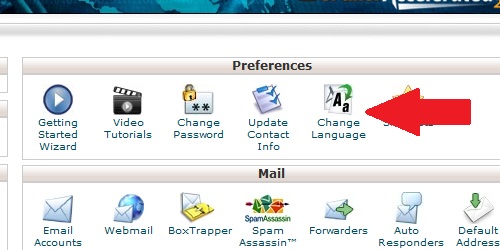
- Locate and click on the "Change Language" icon under the "Preferences" category.
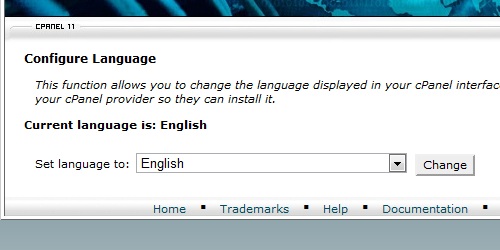
Select the language you want to use from the dropdown list.Click on the "Change" button and cPanel will use the language you selected.
Hasznosnak találta ezt a választ?
Ezenkívül olvassa el
How do I change my cPanel Password?
If you know your cPanel password: Log in to cPanel. Locate the "Change Password" icon. Fill...
How do I update my contact information?
Login to cPanel. Locate and click on the "Update Contact Info" icon in the "Preferences"...
How do I change my cPanel theme?
Login to cPanel. Locate and click on the "Change Style" icon located in the "Preferences"...
Title
Loading...
Loading...