
מאגר מידע
- פורטל ראשי
- מאגר מידע
- Databases
- How do I import a MySQL Database?
קטגוריות
קטגוריות
How do I import a MySQL Database?
- Login to cPanel.
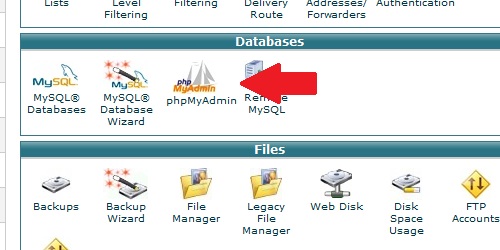
- Locate and click on the "phpMyAdmin" icon under the "Databases" category.
After phpMyAdmin loads, click on the "Import" tab. Click on the "Choose File" button and select your .SQL file. Click on the "Go" button and your MySQL database will import.
?האם התשובה שקיבלתם הייתה מועילה
קראו גם
How do I create a MySQL database?
Login to cPanel. Locate and click on the "MySQL Databases" icon in the "Databases" category....
How do I delete a MySQL database?
Login to cPanel. Locate and click on the "MySQL Databases" icon under the "Databases"...
How do I remove a MySQL user from a database?
Login to cPanel. Locate and click on the "MySQL Databases" icon within the "Databases"...
How do I delete a MySQL user?
Login to cPanel. Locate and click on the "MySQL Databases" icon under the "Databases"...
How do I add a user to a MySQL database?
Login to cPanel. Locate and click on the "MySQL Databases" icon under the "Databases"...
פניות ומידע
Title
Loading...
Loading...