
Teadmistebaas
- Portaali avaleht
- Teadmistebaas
- Databases
- How do I export a MySQL Database?
Kategooriad
Kategooriad
How do I export a MySQL Database?
- Login to cPanel.
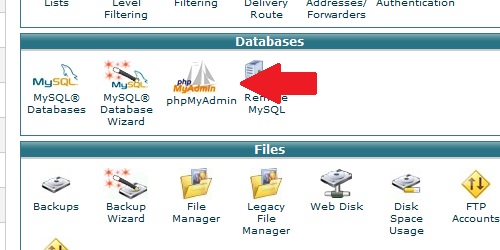
- Locate and click on the "phpMyAdmin" icon under the "Databases" category.
Once phpMyAdmin loads, select a database from the left that you wish to export from the list on the left. Click on the "Export" tab and select an export option:Click on the "Go" button and the database export will begin.
- Quick - Export the entire database using the default options.
- Custom - Select specific tables within the database to export, or change the individual export options.
Kas see vastus oli kasulik?
Loe veel
How do I create a MySQL database?
Login to cPanel. Locate and click on the "MySQL Databases" icon in the "Databases" category....
How do I delete a MySQL database?
Login to cPanel. Locate and click on the "MySQL Databases" icon under the "Databases"...
How do I remove a MySQL user from a database?
Login to cPanel. Locate and click on the "MySQL Databases" icon within the "Databases"...
How do I delete a MySQL user?
Login to cPanel. Locate and click on the "MySQL Databases" icon under the "Databases"...
How do I add a user to a MySQL database?
Login to cPanel. Locate and click on the "MySQL Databases" icon under the "Databases"...
Title
Loading...
Loading...